
octopos — Feb–May 2026 Release
Apple & Google Wallet for rewards, a brand-new Purchase Bill module, a redesigned Purchase Order with built-in analytics, AI-powered vendor invoice scanning, expanded mobile-app access, and hundreds of accuracy and reliability fixes across reports, promotions, and inventory.
Major Features
Apple Wallet & Google Wallet for Rewards
Your customers can now save their loyalty cards to Apple Wallet or Google Wallet straight from your reward emails and texts.
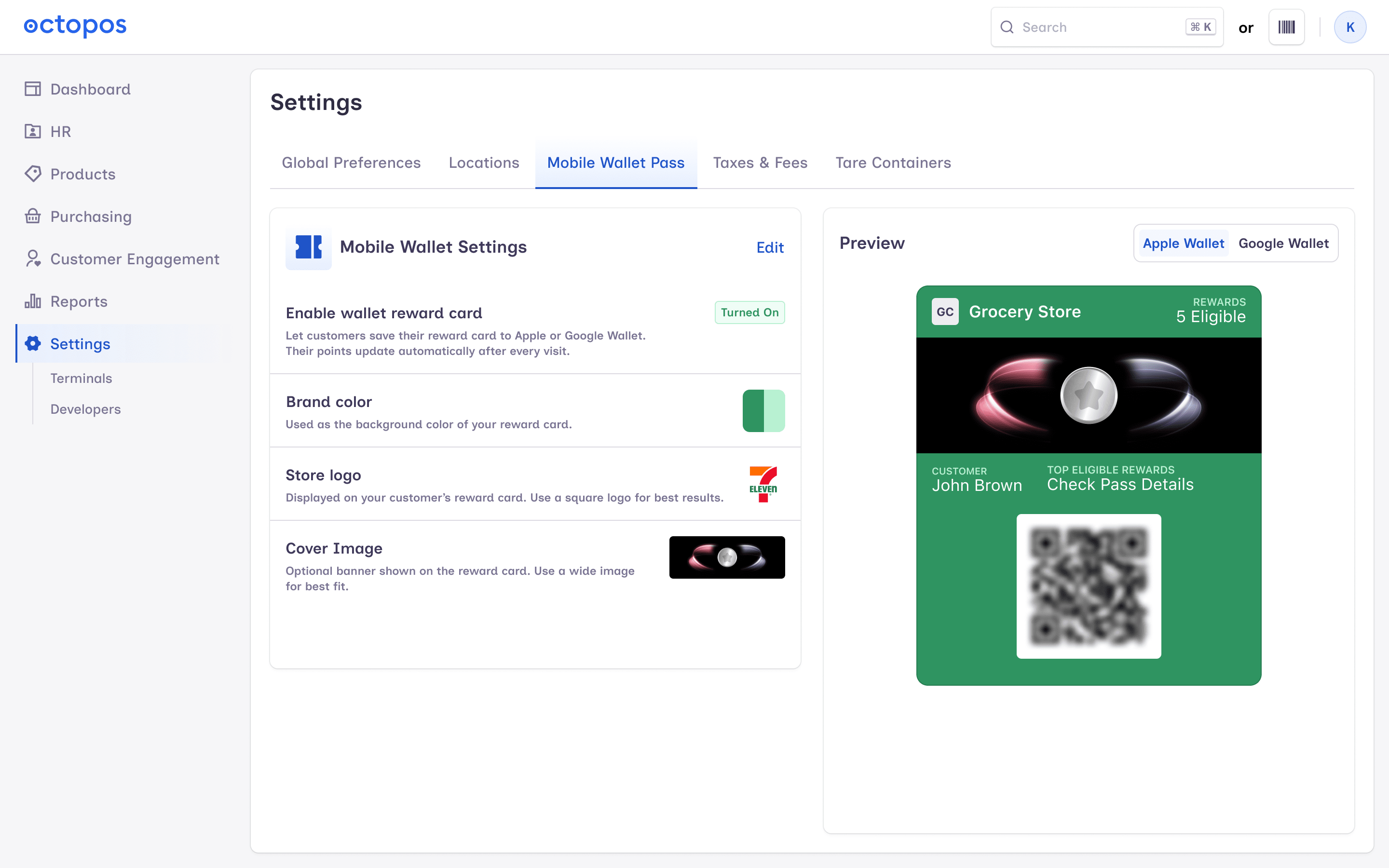
- Beautiful, branded pass design with your cover image, brand colors, and a live preview right in BackOffice while you set it up.
- One-tap Add to Wallet from your public reward-card page, reward emails, and reward SMS messages.
- Knows which phone the customer is on — Android shoppers see the Google Wallet button, iPhone shoppers see Apple Wallet. Loading states for both.
- When a customer earns, redeems, or otherwise sees their rewards change, their Apple Wallet pass quietly updates and notifies them.
- Reward point balances now sync reliably to Google Wallet, so the number on a customer's phone always matches the number in BackOffice.
- New configuration screen in BackOffice for wallet branding — colors, image cropping, and QR-code blur for a polished look.
- Cleaner empty states: if a customer has no rewards yet, the pass no longer shows a confusing “top eligible” label.
- If your wallet setting is turned off and a customer taps the button, they now see a clear message instead of nothing happening.
New Purchase Bill Module
A dedicated place to track what you owe each vendor — separate from your Purchase Orders and Purchase Receipts.
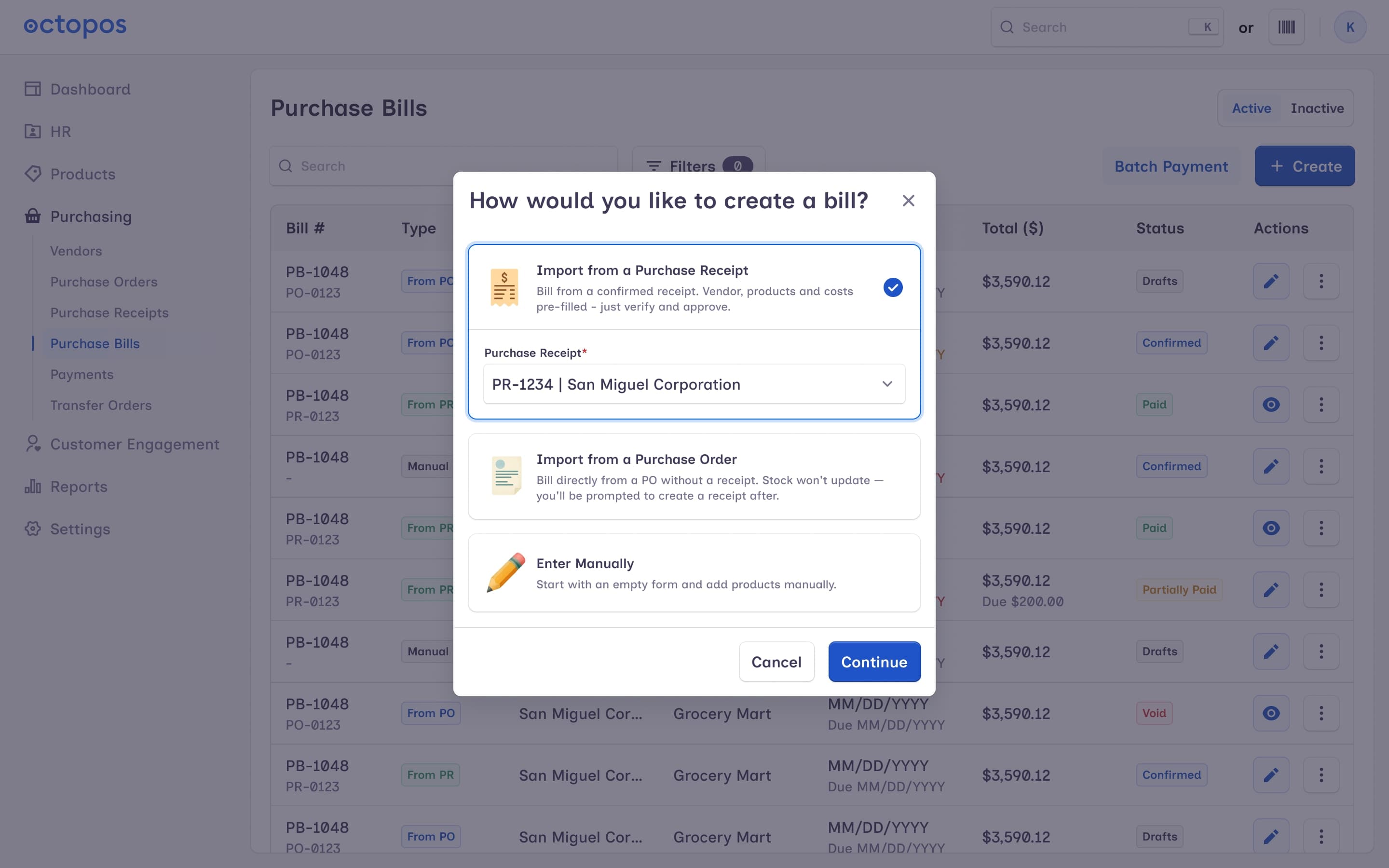
- Create, edit, confirm, and PDF a Purchase Bill in one workflow, with the ability to deactivate or delete bills you no longer need.
- Built-in Payments — record what you've paid against a bill, see full payment history, and filter bills by payment status.
- Turn a confirmed Purchase Receipt into a Purchase Bill in one click, or create a manual bill from scratch when there's no receipt to link to.
- Friendly empty state when there are no bills yet, so new users know what to do first.
- Payment status now shows as Pending (instead of the misleading “Partial”) until the amount paid lines up — no more guessing where a bill stands.
- Separate permissions for Purchase Bills and Purchase Bill Payments, so you can decide exactly who in your team can do what.
Purchase Order Redesign
A clearer, more useful Purchase Order experience with new insights and a refreshed list view.
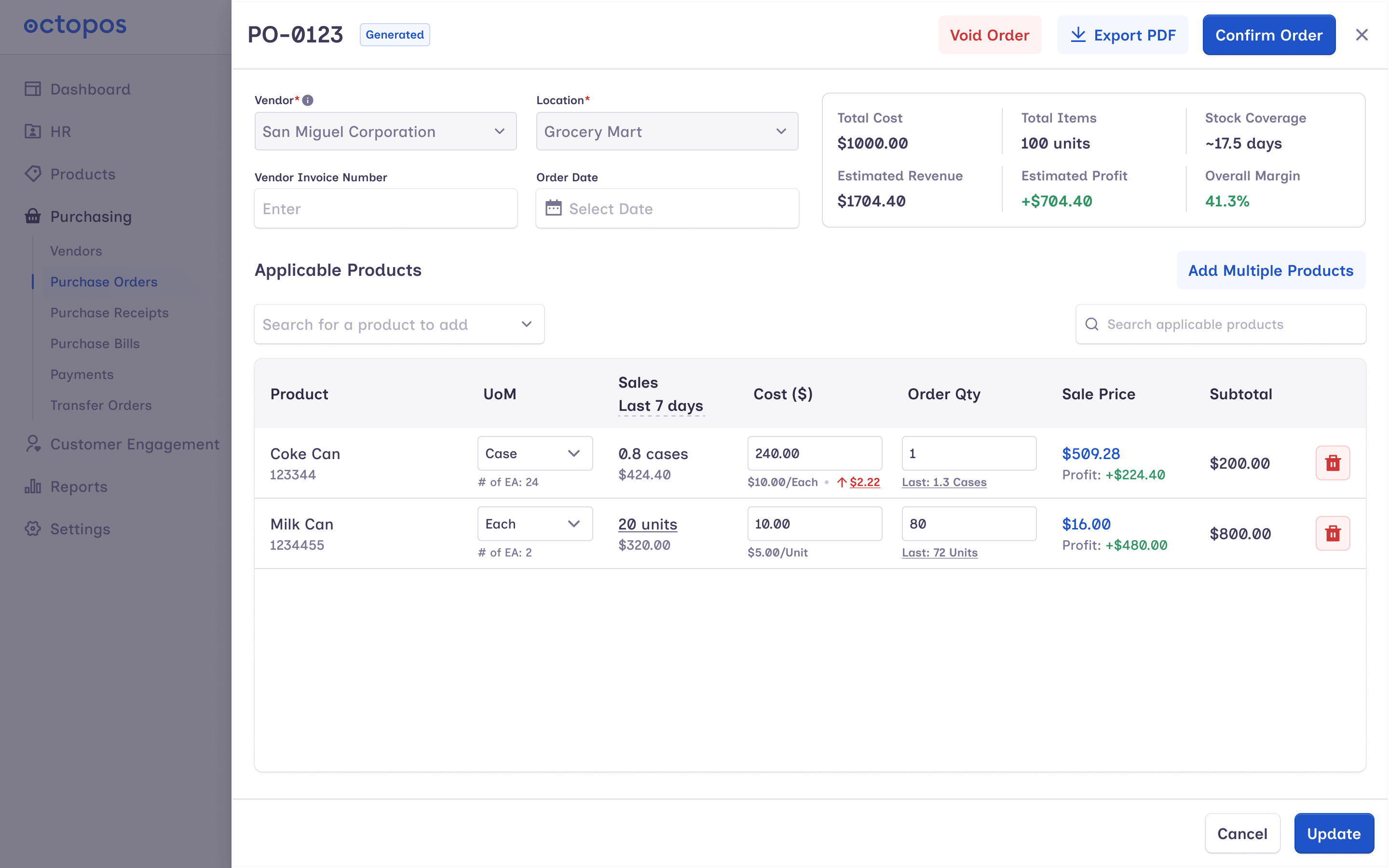
- New PO Formula and Purchase Trend charts on the order overview help you spot what you order most and how spend is changing over time.
- New Stock Coverage indicator on each PO — at a glance, see how long the items you're ordering should last.
- Redesigned Purchase Order list with more columns and a cleaner empty state when there's nothing on order yet.
- Refreshed PO PDF layout, with amounts formatted to match Purchase Receipts so everything looks consistent.
- Streamlined “Void Order” flow — no more double prompt.
- If a Purchase Order already has a receipt, the “Create Receipt” button is disabled so you can't accidentally create a duplicate.
AI Vendor Invoice Upload
Stop typing invoices by hand. Snap a photo or upload a PDF and let Octopos read it for you.
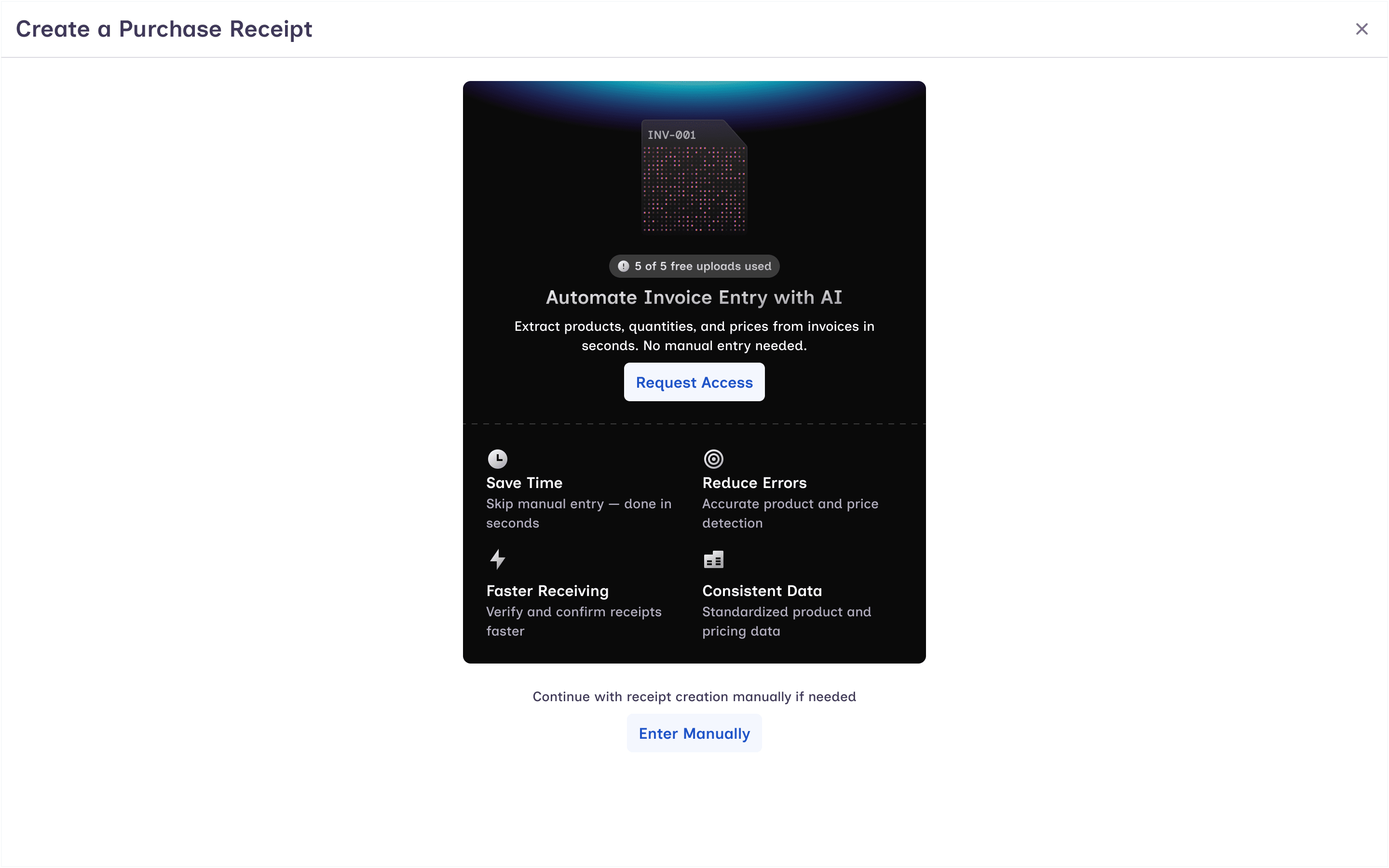
- Upload a PDF or photo of a vendor invoice and Octopos automatically reads the line items, prices, and quantities.
- Visual highlights on the scanned invoice show exactly what the system picked up — easy to spot-check and correct.
- Smart product matching links each invoice line to an existing product in your catalog. If there's no match, create a new product right from the screen.
- Upload your invoice and keep working — we process it in the background and the receipt updates to Processing while we're working on it.
- Cleaner confirmed-receipt view with a new tab layout and refreshed line-item cards, plus a new Margin Impact column so you can see how each receipt affects your margins.
- Set up a brand-new Unit of Measure right from the invoice during confirmation — no need to leave the workflow.
- Product search inside Purchase Receipt now finds products by case UPC and any additional barcode, not just the primary one.
- New Cost Changes report column and improved Audit Trail entries make it easy to see when costs moved and why.
- Friendly empty state when a receipt has no line items yet, and clearer messages when you start a receipt from a PO.
- Available as a monthly add-on — contact your account manager to enable AI Vendor Upload for your business.
Scan Data Compliance Exports (AI Suite)
New compliance and data-export module for AI Suite Business Plan customers.
- Run exports on demand or on a schedule — the schedule respects your plan and runs automatically.
- AGDC report with proper time-zone handling per location and correct UPC vs. primary-barcode behavior.
- Export history page with sticky headers and the right time zone shown for each location, so reports are easy to scan even with many locations.
- Tightened security on saved sFTP credentials and on file names — no surprises in your exported files.
- Available on the AI Suite Business Plan and automatically hidden for accounts that don't have it.
Vendor Payables Report
Brand-new report under Reports → Purchasing to see exactly what you owe each vendor and when.
- Aging buckets calculated using each location's time zone so “30 days overdue” really means 30 days for that store.
- Filter by aging bucket, search by vendor, and export to PDF or Excel.
- Clear bill-date display and due-amount logic, with a fully responsive table that works well on a laptop or phone.
- New permission so you can choose who on your team is allowed to see vendor payables.
Brand Management
Brand is now its own thing in Octopos — not just a field on a product. Manage your brands once, use them everywhere.
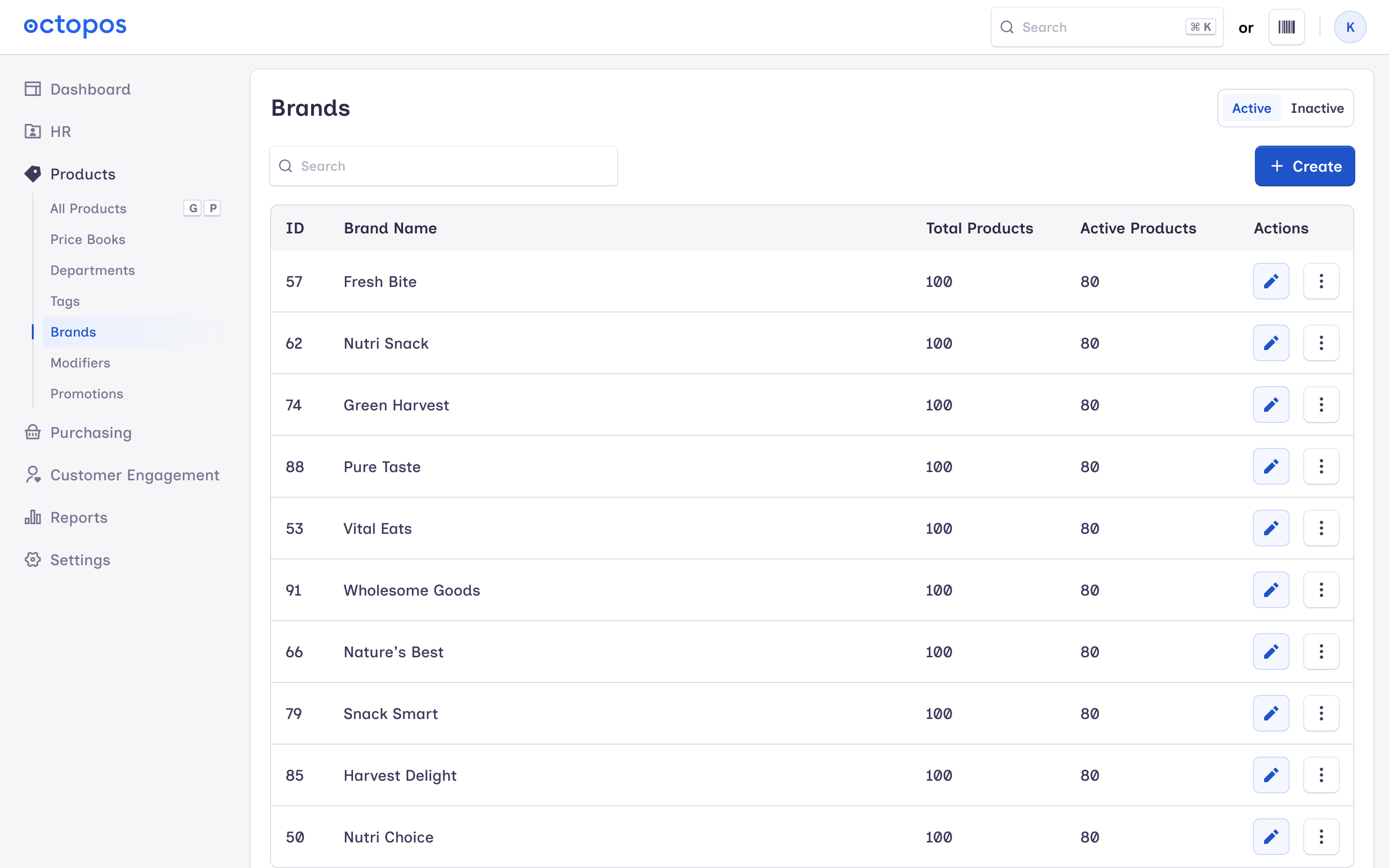
- Create, edit, activate, and deactivate brands — with a quick notification each time so your team knows what changed.
- New Brand filter on every Inventory report and inside Product Sync, plus the mobile app — slice your data by brand in one click.
- Update a brand on a product and the change flows to every location that shares that barcode automatically — no more updating each location by hand.
- On Product Edit, the brand dropdown moved up to Basic Info where you'd expect it.
Quick Inventory Adjustment
Adjust stock without leaving the Products page — Add, Subtract, or Recount inline, see the primary barcode right in the modal, and trust the per-location validation to catch typos (a Restock can't be zero, add/subtract amounts stay within sensible bounds).
Cost Calculator V2
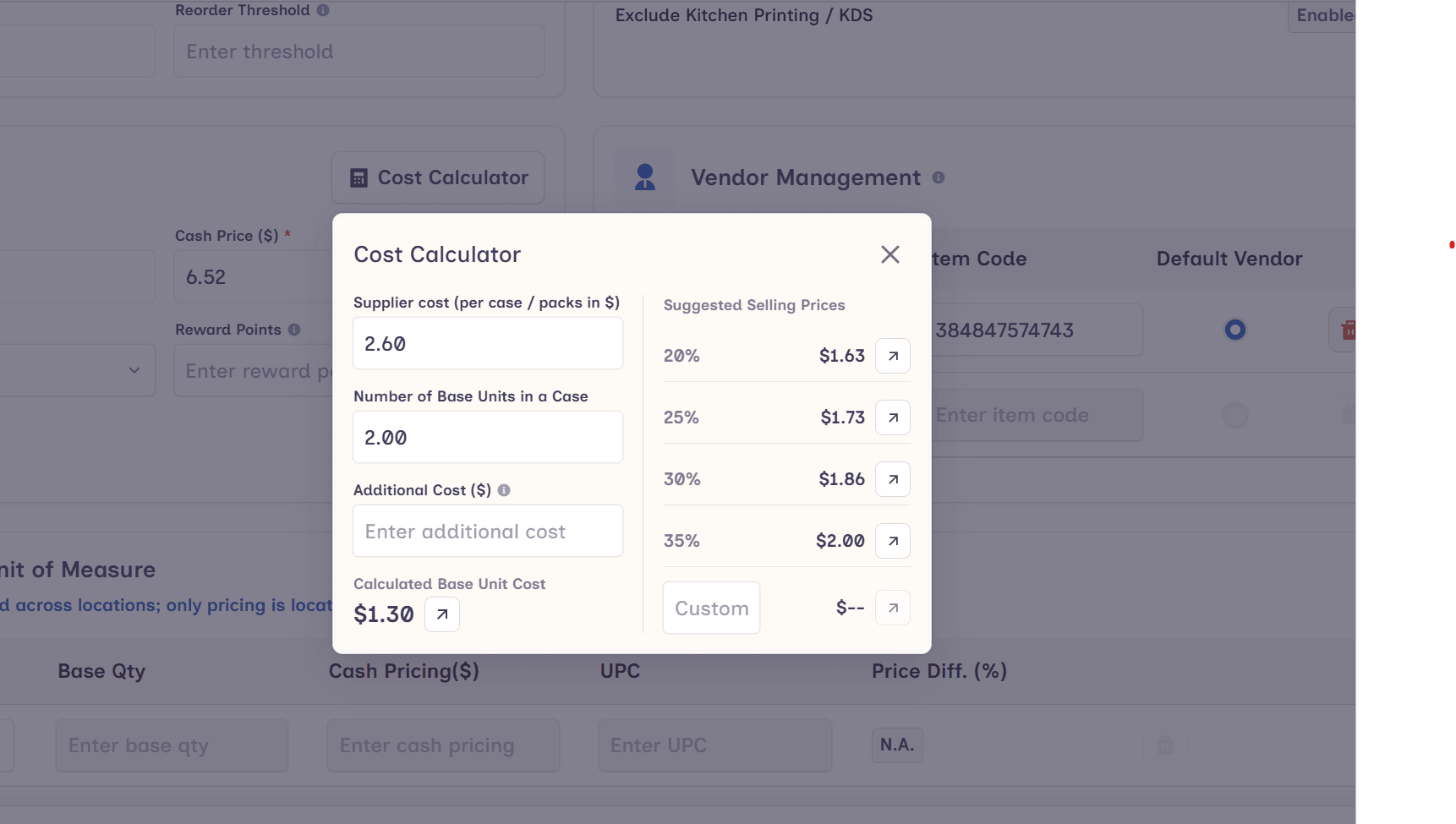
Cost Calculator is now a standalone tool with its own save and edit flow, plus its own refreshed look. Two small fixes shipped alongside: clicking outside the calculator now closes it as expected, and the modal background renders cleanly on every browser.
Manage Purchasing From Your Phone
More of BackOffice is now available in the Octopos mobile app.
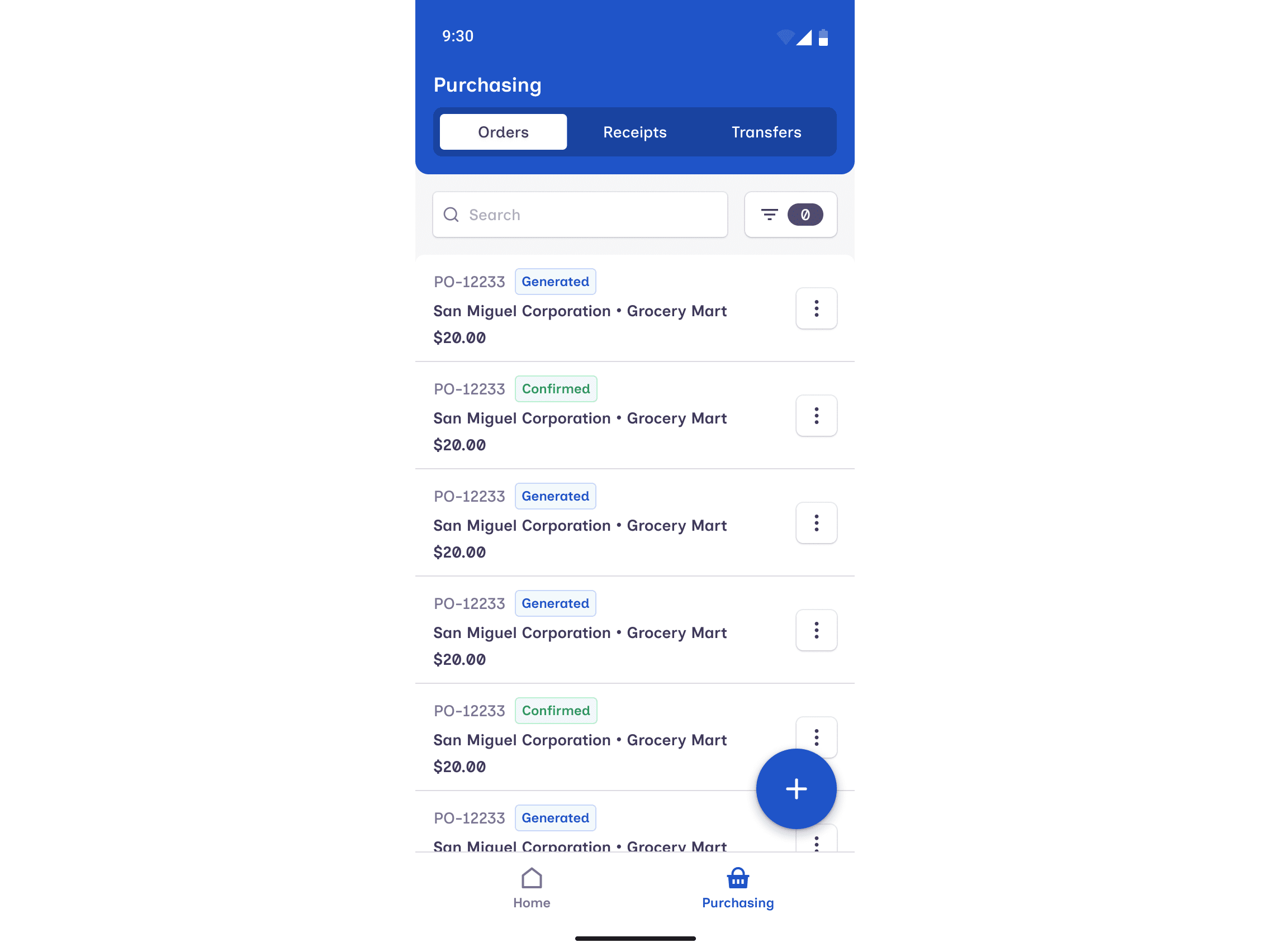
- Manage Purchase Orders, Transfer Orders, and Purchase Receipts directly from the mobile app — no laptop needed when you're on the floor or at a vendor.
- Run Order and POS Station reports tenant-wide right from your phone.
- Faster, cleaner product updates from mobile, including better handling of product images.
- The first “which store am I?” lookup now works without needing to be signed in, so the sign-in flow is one tap quicker.
Improvements & Fixes
Reports — faster and more reliable
We tackled the reports that were slow to load or got stuck on big data sets. The fixes touch most of the report suite:
- Loads more cleanly on large data: Tax Report, Inventory Report, Inventory Trail, Loyalty Member, Discount Order, Order Report, Top Item by Sales / Volume, Variable Item, Online Gift Card Sales, Customer Aged Receivable, Department Sales.
- Faster PDF exports: Customer Credit Ledger, Sales (All Locations), Customer Invoices & Statements, Customer Age Receivable, Sales Summary (Single Location), Customers' Unused Credit, Outstanding Gift Card Liability.
- If a PDF would contain more than 3,000 rows we now warn you up front, so you can narrow the report instead of waiting for a giant file.
- Product Export is more efficient on big catalogs — fewer slowdowns when exporting thousands of items.
Penny-accurate totals
We fixed a long-standing rounding quirk where two screens could disagree by a penny. End-of-day totals, Sales Summary, the dashboard (Top Departments Selling, Sales of Item), and line-item math now all round the same way — what you see on one screen matches every other screen.
Promotions
- Buy-X discount logic fixed — promotions now apply correctly when the qualifying quantity is exactly the trigger.
- Spend X / Pay Y and Tiered Pricing promotions now calculate the discount amount accurately.
- Auto-Generated Discount (AGDC) promotions handle “every X units” and the “Last” type properly.
- “Only once” percentage promotions now behave as expected.
- Single-pack discounts no longer leak into multi-pack offers — each offer stays on its own product set.
- Multi-location: deleting a single product from a promotion now works on the first try.
- New Quick Edit on the promotions list — change a promotion without opening the full editor.
- Promotion start / end times now respect each location's time zone, so a promotion ends when you expect it to end.
- The “Select Products” dialog now shows a clear loading state while it fetches your catalog.
Products & Inventory
- Editing a product's brand now syncs across every location that shares that barcode.
- New single-location products save their starting in-stock value correctly.
- Product Import / Export: more accurate barcode handling (including case UPCs), better validation on UPC and SKU, and clearer messages when something needs your attention.
- Stock-adjustment modal shows the primary barcode and catches bad inputs before they cause a problem.
- Tiered Promotion and Inactive product lists now show correct product counts.
- Redesigned pagination at the bottom of the Products page and a sticky table header so you don't lose your place when scrolling long lists.
Purchase Order, Receipt & Transfer Order
- Consistent cost-input behavior across Purchase Orders, Receipts, and Bills — what you type is what gets saved.
- Tables and search dialogs across Purchasing now lay out properly on small screens.
- Cleaner “location not found” message in the Purchasing flow, so you know what to do next.
- Smoother Purchase Order → Create Receipt flow.
- Consistent length limits on Invoice Number and Notes across Purchase Orders, Receipts, Bills, Transfer Orders, and Payments — no more silent truncation between modules.
- Vendor invoice fields on a Purchase Order are now validated when you submit, so missing values get caught right away.
Payments
- Payment list polish: clearer status badges, filters that update instantly, redesigned table, smoother loading skeletons, and a sticky page-turner so you can stay in flow.
- Payments are now controlled by their own permission, so you can give bookkeeping access without granting full purchasing access.
Customer Engagement
- The public reward-card page no longer errors out for customers in edge cases.
- Reward card emails and SMS are now properly logged, so you have a paper trail of what went out.
- Predefined coupon issues fixed.
- Campaign and customer-aged-receivable screens show data correctly after the fixes.
Scheduling & emails
- Daily summary emails now arrive at midnight Pacific (one hour later than before) so they correctly land on the right day.
- Scheduled Scan Data exports only run for accounts that include the AI Suite — no surprise jobs for everyone else.
Date & time pickers
- Date pickers across reports now support seconds, so you can pull a tighter time window when you need to.
- Date and time fixes specifically on Bottle Deposit Refund, Refunds Report, Sales Report, Customer reports, Employee reports, and Total Employee Tip by Day.
Mobile & responsive
- Tables and dialogs now look and behave properly on iPhone and Android, across every module.
- Buttons, dropdowns, and inputs are easier to tap on small screens.
Other fixes
- Customer Purchase History export no longer slows down on long histories.
- Refund Form catches invalid inputs before you hit submit.
- Sales by Cashier now shows a friendly “no data found” message instead of an empty screen.
- Digital Transactions: cleaner sorting and a clearer screen name.
- Void Report has a working date filter and exports faster.
- Order filters and the Order Report's Total Sales now show discounts correctly (no more misleading positive number where a negative was expected).
- Customer Credit Account PDFs now render images cleanly.
- Segment screens no longer show time-zone mismatches.
- Scanning a product now finds it by any of its barcodes — primary, case, or additional — not just the primary.
- Fixed a bug where a missing page caused the app to keep retrying quietly in the background.
Notes
- Sales totals across reports and the dashboard are now penny-accurate everywhere — no more 1¢ disagreements between screens.
- The Scan Data exports and Mobile Wallet branding are part of the AI Suite — talk to your account manager if you'd like access.